QR sharing & gallery
Photo booth QR code sharing, with the online gallery included
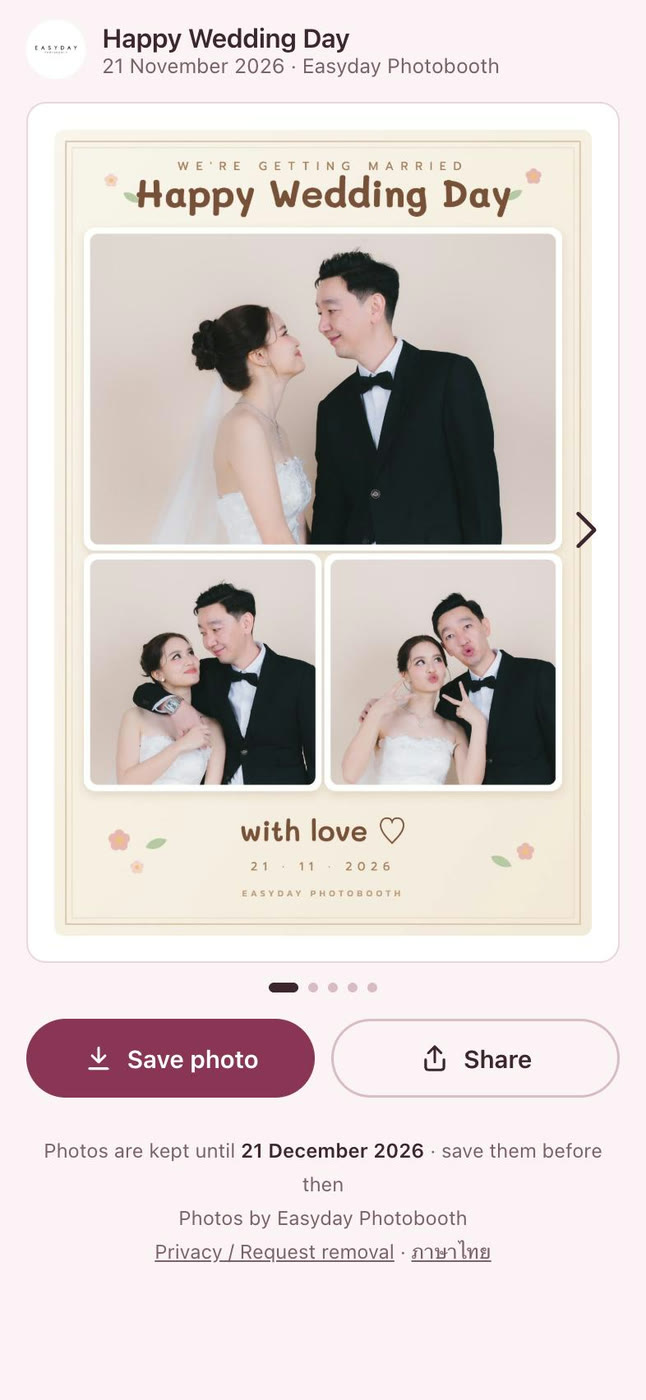
Every round in Daylabooth ends with a QR code on the booth screen. Guests scan it with their phone camera and get a mobile photo page with everything from their round. No app for guests to install, no email to type.
- The QR shows instantly, without waiting for the internet
- The guest page has the framed photo, a GIF and every single shot
- Save to the camera roll or share to Instagram, Facebook or messaging apps
- Single shots come with the frame's colour look or AI style, plus the original if you allow it
- One QR for the whole-event album, updated every round
No internet at the venue? Guests still get a QR
Shooting, framing, printing and saving all happen on the Mac, and the QR shows right away. The guest page waits until the photos reach the cloud, and they upload by themselves once the internet is back. Guests who scanned early see their photos appear on the same page.
Your brand on the guest page
Your shop's logo and website appear on the guest page on every plan, and paid plans include 9 guest page styles to choose from.
Cloud storage comes with the plan
There is no separate server to rent and no extra cloud bill. Paid plans include 5 GB (Weekly), 10 GB (Monthly) or 20 GB (Yearly) of cloud gallery. Need more? Move up to a bigger plan. See pricing.
- You choose how long photos stay online for each event: 30 days by default, or keep them while you have a plan
- The guest page shows when the photos will be removed, and the originals on your Mac are never deleted
- Send the whole event to Google Drive, or download it as one file from the web dashboard
- Each shop's photos are kept in its own account. Nobody else sees them, including us
Want a sharing station at the booth too? Add an iPad with Daylashare and the free Dayla Share app from the App Store.
Try Daylabooth at your next event
Photo booth software for Mac · a full 7-day free trial, no card needed